
Postgres to Snowflake CDC: Setup Notes and the Errors You Will Hit
Most Postgres to Snowflake guides stop at "it works". This one is the setup in the order it has to happen, plus every error the pipeline threw on the way, with the exact message and the fix.
The pipeline: Postgres logical replication, read by OLake (open source, Apache 2.0), written as Apache Iceberg tables into Snowflake's own catalog. Snowflake sees them as Snowflake-managed tables, so there is no stage, no COPY INTO and no Kafka.
The run behind this post: Postgres 16, OLake UI with the Postgres source on v1.1.0, an X-Small Snowflake warehouse. It used 8 customers and 40 orders, then 12 changes.
1. Postgres: four settings, one restart
ALTER SYSTEM SET wal_level = 'logical';      -- needs a restart
ALTER SYSTEM SET max_replication_slots = 10;
ALTER SYSTEM SET max_wal_senders = 10;
ALTER SYSTEM SET wal_sender_timeout = 0;     -- so a long first snapshot is not cut off

CREATE ROLE olake WITH LOGIN REPLICATION PASSWORD '<password>';
GRANT USAGE ON SCHEMA public TO olake;
GRANT SELECT ON ALL TABLES IN SCHEMA public TO olake;
ALTER DEFAULT PRIVILEGES IN SCHEMA public GRANT SELECT ON TABLES TO olake;

CREATE PUBLICATION olake_pub FOR TABLE customers, orders;
SELECT pg_create_logical_replication_slot('olake_slot', 'pgoutput');
Check before moving on:
SHOW wal_level;                                         -- logical
SELECT slot_name, plugin, active FROM pg_replication_slots;
SELECT pubname, puballtables FROM pg_publication;
On RDS, Aurora, Azure or Cloud SQL, wal_level is a parameter-group or server setting, not ALTER SYSTEM.
Error: the replication connection is refused
FATAL: must be superuser or replication role to start walsender
The user has SELECT but not the REPLICATION attribute. Run ALTER ROLE olake WITH REPLICATION;. On RDS and Aurora, REPLICATION is reserved, so grant the rds_replication role instead.
Not an error yet, but it will be
- Tables without a primary key replicate inserts only. Give them
ALTER TABLE <table> REPLICA IDENTITY FULL;so updates and deletes carry the old row. - One slot and one publication per job. Two jobs sharing a slot read each other's changes, and both lose data.
- The slot holds WAL until it is read. Pause a job for a week and Postgres keeps a week of WAL. Set
max_slot_wal_keep_sizeand alert onpg_replication_slots.wal_status.
2. Snowflake: database, role, service user, network policy, token
Run once as ACCOUNTADMIN:
CREATE WAREHOUSE IF NOT EXISTS OLAKE_WH WAREHOUSE_SIZE = XSMALL AUTO_SUSPEND = 60 AUTO_RESUME = TRUE;
CREATE DATABASE IF NOT EXISTS OLAKE_DEMO;
ALTER DATABASE OLAKE_DEMO SET CATALOG = 'SNOWFLAKE';
ALTER DATABASE OLAKE_DEMO SET EXTERNAL_VOLUME = 'SNOWFLAKE_MANAGED';

CREATE ROLE IF NOT EXISTS OLAKE_ROLE;
GRANT USAGE, CREATE SCHEMA ON DATABASE OLAKE_DEMO TO ROLE OLAKE_ROLE;
GRANT USAGE ON WAREHOUSE OLAKE_WH TO ROLE OLAKE_ROLE;
GRANT ROLE OLAKE_ROLE TO ROLE SYSADMIN;

CREATE USER IF NOT EXISTS OLAKE_SVC TYPE = SERVICE DEFAULT_ROLE = OLAKE_ROLE;
GRANT ROLE OLAKE_ROLE TO USER OLAKE_SVC;

USE SCHEMA OLAKE_DEMO.PUBLIC;
CREATE NETWORK RULE IF NOT EXISTS olake_ip
  MODE = INGRESS TYPE = IPV4 VALUE_LIST = ('<OLake egress IP>/32');
CREATE NETWORK POLICY IF NOT EXISTS olake_network_policy
  ALLOWED_NETWORK_RULE_LIST = ('OLAKE_DEMO.PUBLIC.olake_ip');
ALTER USER OLAKE_SVC SET NETWORK_POLICY = olake_network_policy;

ALTER USER OLAKE_SVC ADD PROGRAMMATIC ACCESS TOKEN OLAKE_PAT
  ROLE_RESTRICTION = 'OLAKE_ROLE' DAYS_TO_EXPIRY = 30;
The two database settings are what make every table Snowflake-managed, on Snowflake's own storage. You don't need an S3 bucket, an IAM role or an external volume of your own.
Error: the token is refused before it exists
Network Policy is required when creating a programmatic access token for user OLAKE_SVC
Snowflake issues a programmatic access token to a service user only under a network policy. Create the rule and the policy first, then the token. On a laptop the egress IP is your public IP (curl -s https://checkip.amazonaws.com). On a server, it is the NAT gateway or public IP.
Error: the destination test fails at the token exchange
OLake exchanges the token at /v1/oauth/tokens before anything else, so a bad token fails there. On a later rerun of this setup, the cause was a home IP that had changed since the rule was written, and the exchange came back unauthorized_client. Adding the new IP to olake_ip fixed it. The other two causes, in order of likelihood:
- Wrong scope or role. The scope must be
session:role:OLAKE_ROLE, matching the token'sROLE_RESTRICTION. - Expired token. The default is 15 days. Re-issue it with
ALTER USER ... ADD PROGRAMMATIC ACCESS TOKEN.
Test outside the UI with the same call OLake makes:
curl -s -X POST "https://<account_identifier>.snowflakecomputing.com/polaris/api/catalog/v1/oauth/tokens" \
  -H 'Content-Type: application/x-www-form-urlencoded' \
  --data-urlencode grant_type=client_credentials \
  --data-urlencode scope=session:role:OLAKE_ROLE \
  --data-urlencode client_secret=<your PAT>
A good token returns JSON with an access_token.
3. OLake: source, destination, job
OLake UI runs from the Docker Compose install and listens on http://localhost:8000.
Source. Pick Postgres, turn on Enable CDC, and enter the slot and publication from step 1. If Postgres runs in another container, the host is host.docker.internal.
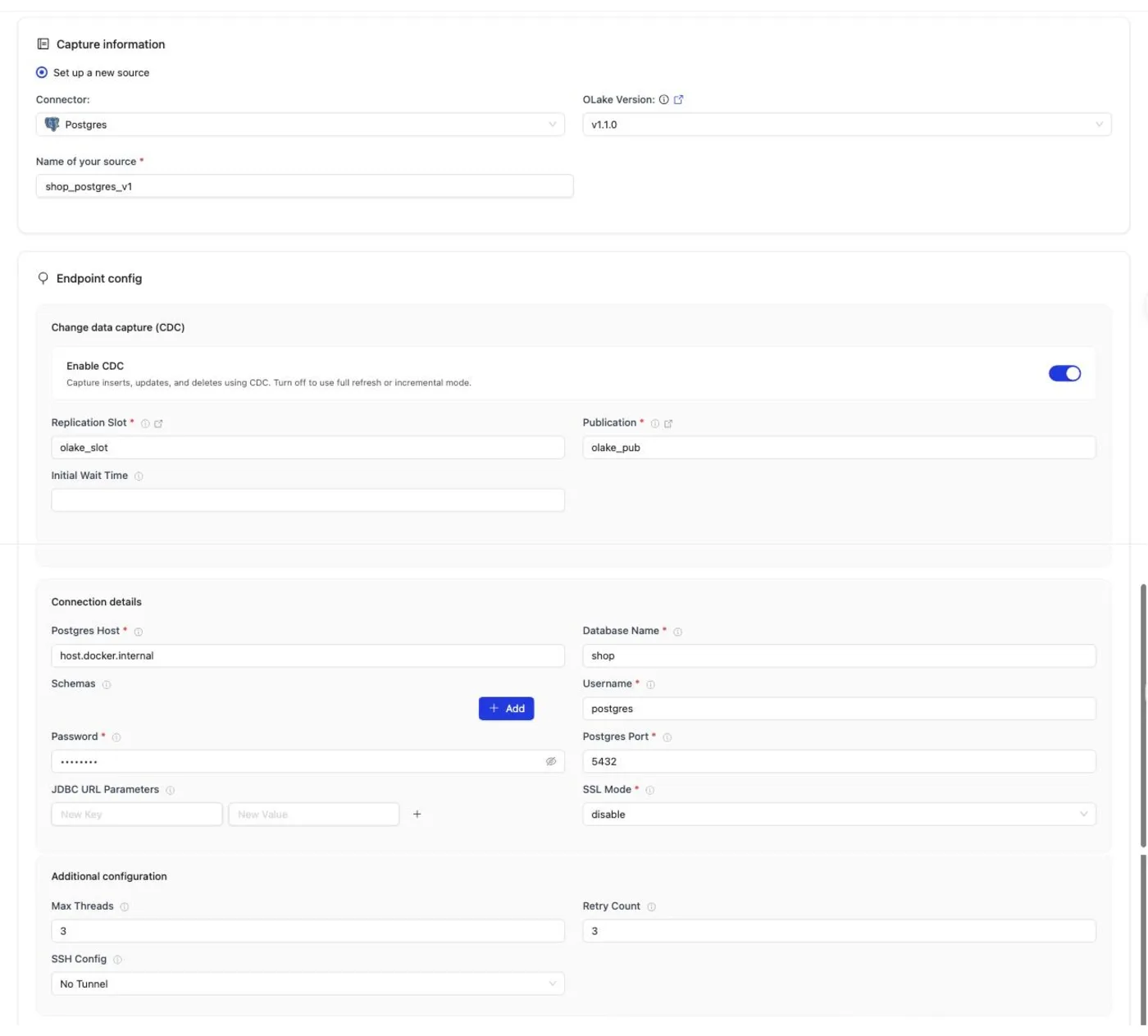
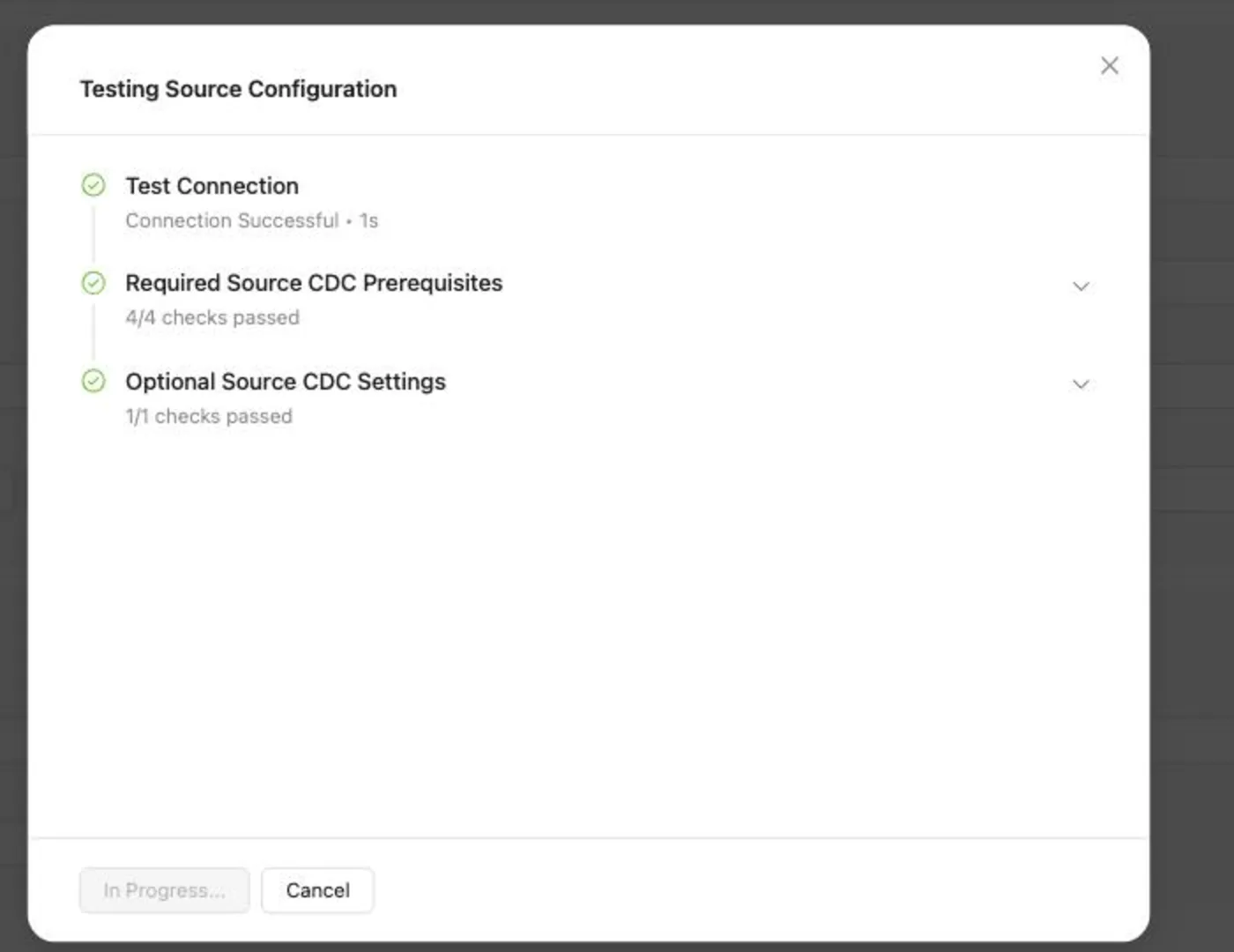
Set up source runs the connection test and the CDC checks before it saves. All four required checks have to pass. This is where a missing wal_level or a missing slot shows up, before any data moves.
Destination. Pick Apache Iceberg, catalog type Horizon, and authentication Programmatic Access Token (PAT). The catalog URL is https://<account_identifier>.snowflakecomputing.com/polaris/api/catalog, the warehouse is OLAKE_DEMO, and the scope is session:role:OLAKE_ROLE.
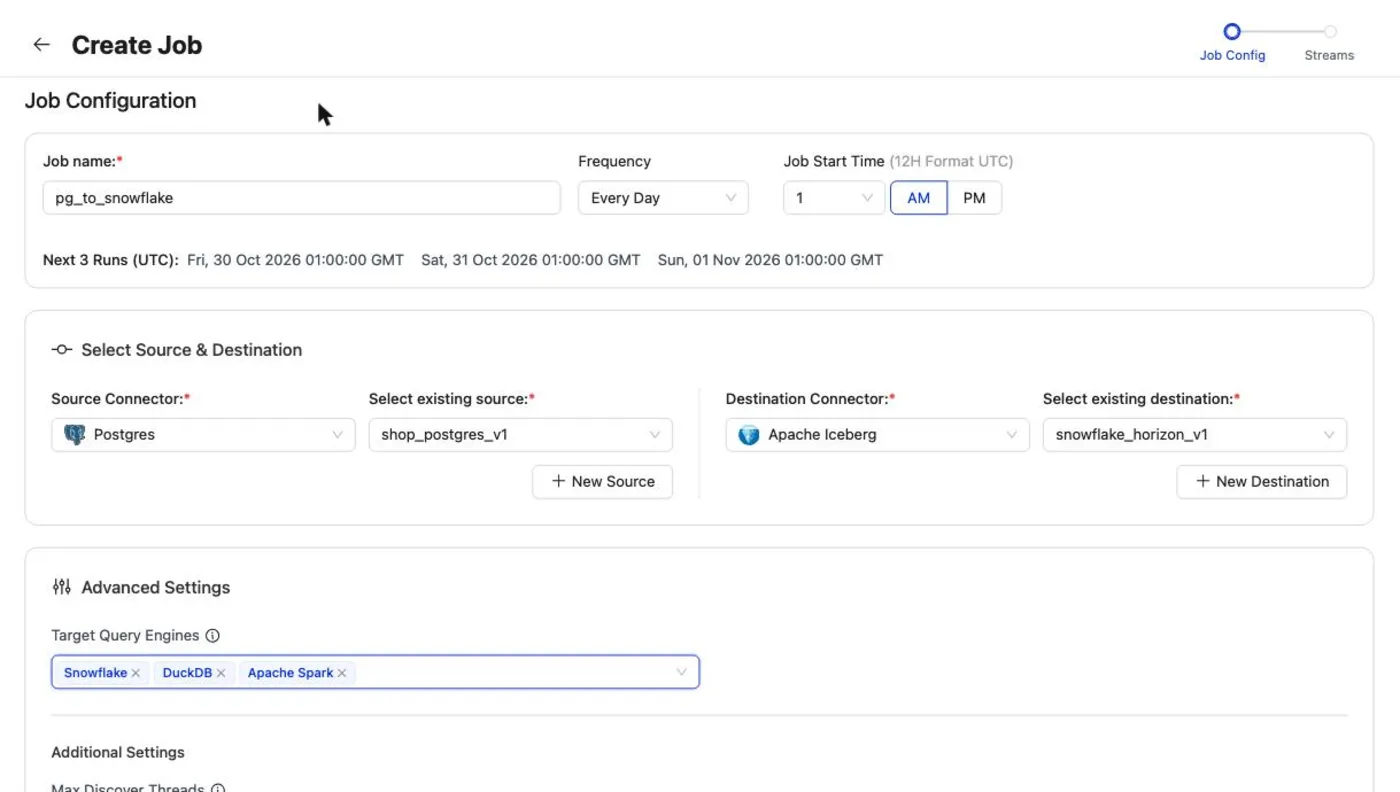
Job. Set the target query engines to Snowflake, plus DuckDB or Spark if they will read the tables. OLake picks the update and delete format every listed engine can read and sets it on each stream. In this run that was positional deletes.
Error: Snowflake shows stale rows
A job created without a target query engine defaults to equality deletes, and Snowflake does not read those. The updates land, but Snowflake keeps showing the old rows.
Fix: edit the job's streams and set the target query engine to Snowflake. OLake switches the upsert type, and on the next sync it rewrites the existing delete files into the new format.
4. Query it, and the last error
The first sync copied 8 customers and 40 orders in 41 seconds, container start included. The schema is named after the job, the database and the source schema, so pg_to_snowflake on database shop became pg_to_snowflake_shop_public.
Error: the table "does not exist"
SQL compilation error:
Object 'OLAKE_DEMO.PG_TO_SNOWFLAKE_SHOP_PUBLIC.CUSTOMERS' does not exist or not authorized.
Snowflake upper-cases unquoted names, and OLake keeps the lowercase Postgres names. Quote them:
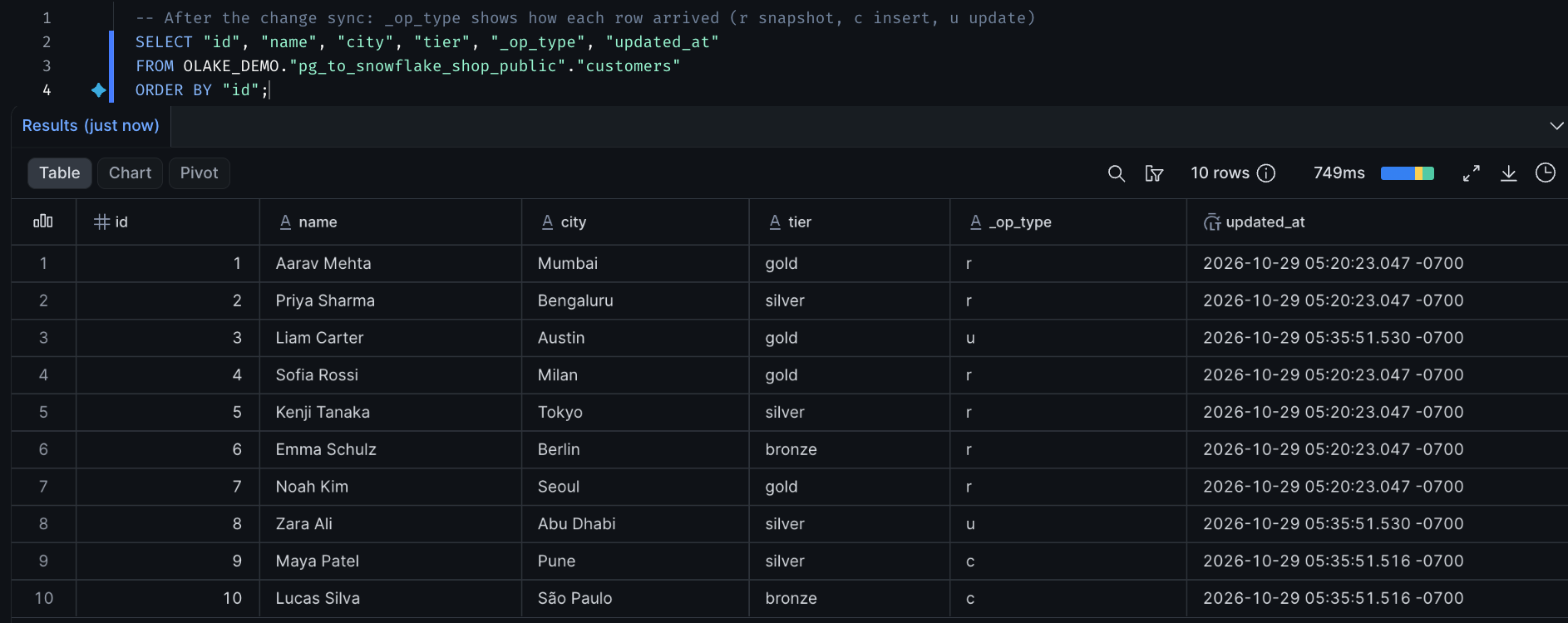
SELECT "id", "name", "city", "tier", "_op_type", "updated_at"
FROM OLAKE_DEMO."pg_to_snowflake_shop_public"."customers"
ORDER BY "id";
The rule runs both ways: if you create the database as "olake_demo" in quotes, OLake must be given olake_demo, not OLAKE_DEMO.
5. The change sync
12 changes went in: 7 inserts and 5 updates. The second sync read only those 12 records (589 bytes) from the slot and finished in 23 seconds.
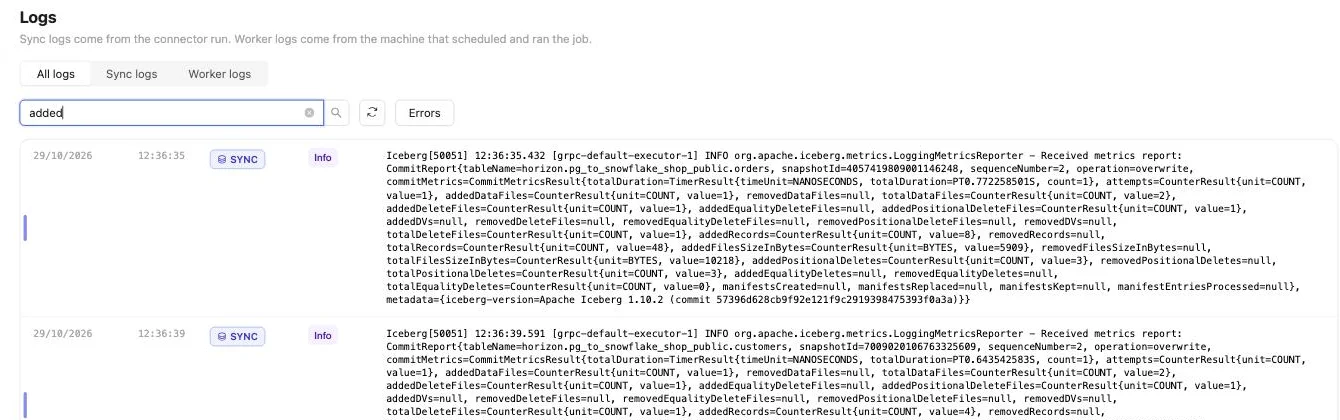
For customers that meant one new data file with 4 rows, plus one small delete file that retires the 2 old versions. The sync log's commit report shows it: addedDataFiles=1, addedRecords=4, addedPositionalDeleteFiles=1, addedPositionalDeletes=2.
Each row carries _op_type: r for snapshot rows, c for inserts and u for updates. A deleted row stays as a marker with _op_type = 'd' and null fields, so filter it out in queries that should not see deletes.
Things that are not errors but will surprise you
numericarrives asFLOAT. The order totals still matched Postgres to the cent, but round at query time when you need exact decimal arithmetic.- Timestamps become
TIMESTAMP_LTZ(6)in UTC.json,jsonb,uuidand arrays arrive asVARCHAR. - Freshness is a schedule, down to one minute, not sub-second streaming.
- Small files add up. A table that gets a new file every minute wants compaction. Snowflake compacts manifests for free, and data-file compaction is up to the writer side.
The full guide has the data type table, the AWS Glue variant and the DuckDB and Spark connection steps: Postgres to Snowflake on olake.io.
About the author
- Building Apache Iceberg Native solutions, helping companies to adopt fully open and interoperable lakehouse.
Comments
Join the discussionNo comments yet. Be the first to comment.